- Nov 14
Post-Quantum Security Starts With Passkeys, Not Certificates: A Plain-English Plan for Small Businesses
- IAMPathway Trainer
- Microsoft Entra ID
"Post-quantum" sounds like a problem for governments and banks, not a ten-person accounting firm. Then a vendor questionnaire asks for your "PQC roadmap," a consultant offers a "quantum-safe certificate inventory," and you wonder whether you're already behind.
Here's the plain-English version. A large enough quantum computer would break the public-key cryptography behind HTTPS and VPNs, certificate and software signatures, and the key pairs inside today's passkeys. Replacements are standardized and governments have set dates, but most of the algorithm swapping in TLS, browsers and cloud services falls on vendors like Microsoft, Apple, Google and your VPN maker.
What a small business controls directly is how its people sign in, and that's where the most useful preparation happens. Not because passkeys are already quantum-safe (they aren't), but because they're the one sign-in method built so the cryptography underneath can be replaced. Passwords, SMS codes and push approvals can't be upgraded, only retired.
Below: what the standards actually say, why passkeys come first, the honest limits of that argument, and a step-by-step plan for a Microsoft 365 / Entra ID tenant.
Post-quantum in plain English, with real dates
Today's public-key algorithms (RSA, elliptic-curve Diffie-Hellman, ECDSA, EdDSA) rely on math problems that a "cryptanalytically relevant quantum computer" could solve. Nobody has built one yet, and estimates of when vary. In August 2024, NIST published its first three post-quantum standards: FIPS 203 (ML-KEM) for key establishment, and FIPS 204 (ML-DSA) and FIPS 205 (SLH-DSA) for digital signatures.
The dates people quote mostly come from three places:
NIST IR 8547. NIST published the final version of Transition to Post-Quantum Cryptography Standards on October 27, 2026 (draft: November 2024). NIST will deprecate quantum-vulnerable public-key algorithms, including RSA, ECDSA and EdDSA, after 2030 and disallow them under NIST standards after 2035. "Deprecated" means still usable, with the data owner accepting the risk.
US federal directives. The same report says Executive Order 14412 and OMB Memorandum M-26-15 (both June 2026) direct federal agencies to mitigate as much quantum risk as feasible by December 31, 2030. High-value and high-impact federal systems must adopt PQC for key establishment by the end of 2030 and for digital signatures by the end of 2031. These bind agencies, not your business, but vendors who sell to agencies will build roadmaps around them.
NSA CNSA 2.0. For national security systems, NSA's PQC resource hub says new commercial systems must support quantum-resistant algorithms by 2027, and legacy systems are to be phased out by 2030.
Microsoft has its own clock. In a June 30, 2026 Security Blog post, Microsoft said it is accelerating its Quantum Safe Program, with the goal "to transition products and services to PQC by 2029." The Entra passkey FAQ still says passkeys "aren't fully quantum safe today" and that the full transition for Entra authentication, including passkeys, is "targeted by 2033." The two pages don't agree as of November 14, 2026. Treat 2029 as Microsoft's newer company-wide goal, and neither date as a feature commitment.
So "PQC mandates by the end of 2030" is accurate if you're precise: those deadlines bind US federal high-priority and national security systems, and NIST's general deprecation starts after 2030.
Why authentication is different from encryption
For identity people, the key sentence in NIST IR 8547 is in its authentication section. Unlike encryption, an authentication system "remains secure as long as the cryptographic algorithms and keys used to perform the authentication are secure when the authentication is performed."
That splits the problem in two:
Encryption faces "harvest now, decrypt later." Someone who records your VPN traffic or an encrypted email today can decrypt it once a quantum computer exists. That's why NIST and Microsoft put key establishment in TLS and VPNs first. If you hold data that must stay secret for a decade (tax records, health data, legal files), its clock is already running.
Authentication has no harvest problem, but it has a cliff. A recorded 2026 passkey sign-in is useless in 2035, because each challenge is used once. But NIST adds that once quantum computers capable of breaking these algorithms exist, "authentication using these algorithms will need to immediately transition to the use of quantum-resistant algorithms." It also warns that the transition "may also require obtaining hardware cryptographic tokens that support the quantum-resistant algorithms."
The lesson isn't "panic about passkeys." It's "be able to swap every user's credential quickly, with hardware you can buy and a process you've practiced." You can only swap credentials designed to be swapped.
Why passkeys are the right starting point
No shared secret to harvest or replay
A password, SMS code or push approval can be handed over and relayed to the real sign-in page in real time. Phishing kits do that today, no quantum computer needed. Microsoft's passkey overview describes the alternative: the private key stays on the user's device, the public key is stored with the service, and the key pair is unique to that service, "so your passkey only works on the website or the app you created it for." Each sign-in signs a fresh challenge from Microsoft Entra ID.
So the service never holds anything worth stealing (a leaked public key signs no one in), and every credential is separate, so retiring one is a per-user action.
The algorithm is negotiated, not hard-coded
When a service asks an authenticator to create a passkey, the W3C WebAuthn Level 3 specification has it send a pubKeyCredParams list: "the key types and signature algorithms the Relying Party supports, ordered from most preferred to least preferred." The authenticator makes "a best-effort to create a credential of the most preferred type possible." Algorithms are named by COSE identifiers. If a service lists none, the spec defaults to -7 (ES256, ECDSA on the P-256 curve), and it recommends listing -8 (EdDSA), -7 and -257 (RS256) for wide compatibility.
The post-quantum identifiers already exist:
RFC 9964 (May 2026, IETF Standards Track) defines how ML-DSA is used in JOSE and COSE.
The IANA COSE algorithms registry lists ML-DSA-44 (-48), ML-DSA-65 (-49) and ML-DSA-87 (-50), each referencing RFC 9964.
The FIDO Alliance's Server Requirements for WebAuthn Level 3 and CTAP 2.3 lists all three ML-DSA identifiers with status "Recommended." That document is a review draft dated February 26, 2026, and "Recommended" means servers MAY implement them, not that they must.
So the plumbing is standardized. A service that supports ML-DSA puts -48 or -49 at the front of its list, a capable authenticator creates an ML-DSA key pair, and older authenticators keep making ES256 keys. The protocol doesn't need redesigning.
Replacing a credential is a routine admin task
Passwords have no algorithm to swap, and the weakness of SMS and push is the human relay, which better server math doesn't fix. Passkeys already have a lifecycle in Entra ID (register, restrict by model, delete, re-register), which is exactly what a post-quantum swap would use. The FIDO Alliance's white paper on FIDO in a post-quantum world (February 2024) calls crypto-agility "a major requirement for post quantum standards" and sets the objective of "a seamless transition from the currently defined algorithm to PQC algorithms" for both authenticator providers and relying parties.
The honest limits
Today's passkeys are not quantum-safe. ES256 is ECDSA, which NIST lists as quantum-vulnerable, deprecated after 2030. The rollout's value is removing phishable methods now and readiness to swap later.
An existing passkey can't be upgraded in place. Its algorithm is fixed when it's created. The swap means registering a new credential on an authenticator that supports the new algorithm, then deleting the old one, one user at a time.
Three parties have to be ready. The authenticator (key, phone or platform), the browser or OS in between, and the service (Entra ID) all have to support ML-DSA. As of November 14, 2026, I couldn't find any Microsoft Learn page saying Entra ID accepts ML-DSA passkeys. The FAQ above implies it doesn't yet.
Hardware security keys may need replacing. NIST says the transition "may also require obtaining hardware cryptographic tokens." PQC keys are only now appearing: Yubico opened a public beta of a PQC-capable YubiKey on November 3, 2026, with ML-DSA passkeys and ML-KEM. Yubico describes it as "for testing and evaluation, not production use." Don't assume a firmware update will convert today's keys; budget for replacement.
Attestation and certification have to catch up. Under Microsoft's vendor attestation requirements, a new key model needs FIDO2 certification and a FIDO Metadata Service entry, plus up to four weeks for Entra ID to pick it up.
Passkeys don't fix encryption. If you run your own VPN or encrypt long-lived data, that's a separate, more urgent vendor conversation.
What "not certificates" means, and what to leave alone for now
"Not certificates" doesn't mean certificates don't matter. It means a small business gains little by starting there.
Most of your TLS isn't yours to change. Microsoft 365, browsers and SaaS apps negotiate TLS between their own software. Microsoft recommends TLS 1.3 as the baseline that enables hybrid post-quantum key exchange. Your job is to stay patched and ask vendors good questions (step 8).
Windows has the building blocks, but they're not a project for you yet. Microsoft announced general availability of ML-KEM and ML-DSA in Windows 11, Windows Server 2025 and .NET 10. AD CS can now issue ML-DSA certificates on Windows Server 2025 with the May 2026 security update (KB5087539), and it requires CNG key storage providers, not legacy CSPs. ML-KEM and composite certificates are "Planned (Phase 2)," and everything that validates your certificates would need to understand ML-DSA. Unless you have a specific need, skip a production post-quantum CA in 2026.
Don't buy "quantum-safe" add-ons you can't verify. Ask which NIST algorithm they use (step 8).
Do take one certificate inventory: the long-lived ones. If you run an on-premises CA or sign your own software, note the algorithms and expiry dates of your root and code-signing certificates. Microsoft's AD CS page notes these must stay trustworthy for their full validity period.
A step-by-step plan for a small Entra ID tenant
Passkeys (FIDO2) work in every Entra ID edition, including Free, per Microsoft's enablement guide. Enforcing them with Conditional Access needs Entra ID P1.
Step 1: Inventory how people sign in today
Find out who still relies on phishable methods and which passkeys already exist (Microsoft's rollout may have created some; see step 2). Use Entra ID > Authentication methods > User registration details, or Microsoft Graph PowerShell. The userRegistrationDetails report needs AuditLog.Read.All:
Connect-MgGraph -Scopes "AuditLog.Read.All",
    "UserAuthMethod-Passkey.Read.All"

Get-MgReportAuthenticationMethodUserRegistrationDetail -All |
    Select-Object UserPrincipalName, IsAdmin,
        @{n = 'Methods'; e = { $_.MethodsRegistered -join ', ' }} |
    Export-Csv .\auth-methods.csv -NoTypeInformation
Then list the passkeys themselves. Model and AAGUID tell you which authenticators a future swap would replace. The fido2AuthenticationMethod resource also documents attestationLevel and passkeyType (device-bound or synced):
$users = Get-MgUser -All -Property Id, UserPrincipalName
$rows = foreach ($u in $users) {
    Get-MgUserAuthenticationFido2Method -UserId $u.Id |
        Select-Object @{n = 'User'; e = { $u.UserPrincipalName }},
            Model, AaGuid, AttestationLevel, CreatedDateTime
}
$rows | Export-Csv .\passkeys.csv -NoTypeInformation
Keep both CSVs. They're the identity slice of the "cryptographic inventory" NIST, Microsoft and CISA all say to start with.
Step 2: Check what the September 1 change already did
Microsoft's SMS and voice retirement page says that starting September 1, 2026, users enabled for SMS or voice were auto-enabled for passkeys. They were "put into a passkey profile allowing all types of passkeys," and the registration campaign switched to Microsoft managed, nudging them after MFA with unlimited snoozes. The temporary Graph opt-out (passkeyDynamicMigration) ends February 1, 2027. The dates:
February 1, 2027: Microsoft-provided SMS and voice is retired for everyone except Global Administrators and external users. Internal guests are included. Users whose only method is SMS or voice then get a blocking passkey registration prompt.
July 1, 2027: the same retirement for Global Administrators and external users.
Unless you have a regulatory need to buy telephony through Microsoft Security Store, that's a ready-made deadline for your passkey project.
Step 3: Set passkey profiles on purpose
Following How to enable passkeys (FIDO2):
Sign in to the Microsoft Entra admin center as at least an Authentication Policy Administrator.
Go to Entra ID > Security > Authentication methods > Policies and select Passkey (FIDO2). If you haven't already, opt in to passkey profiles from the banner. You can't opt out afterward, and your existing settings move into a Default passkey profile.
On Configure, make sure Allow self-service set up is Yes. If it's No, users can't register through Security info.
Select + Add passkey profile to build a stricter profile for admins: Passkey types = device-bound, Enforce attestation = Yes. Microsoft's own example uses this pattern for IT admins and executives.
On Enable and Target, assign the strict profile to your admin group and the default profile to everyone else.
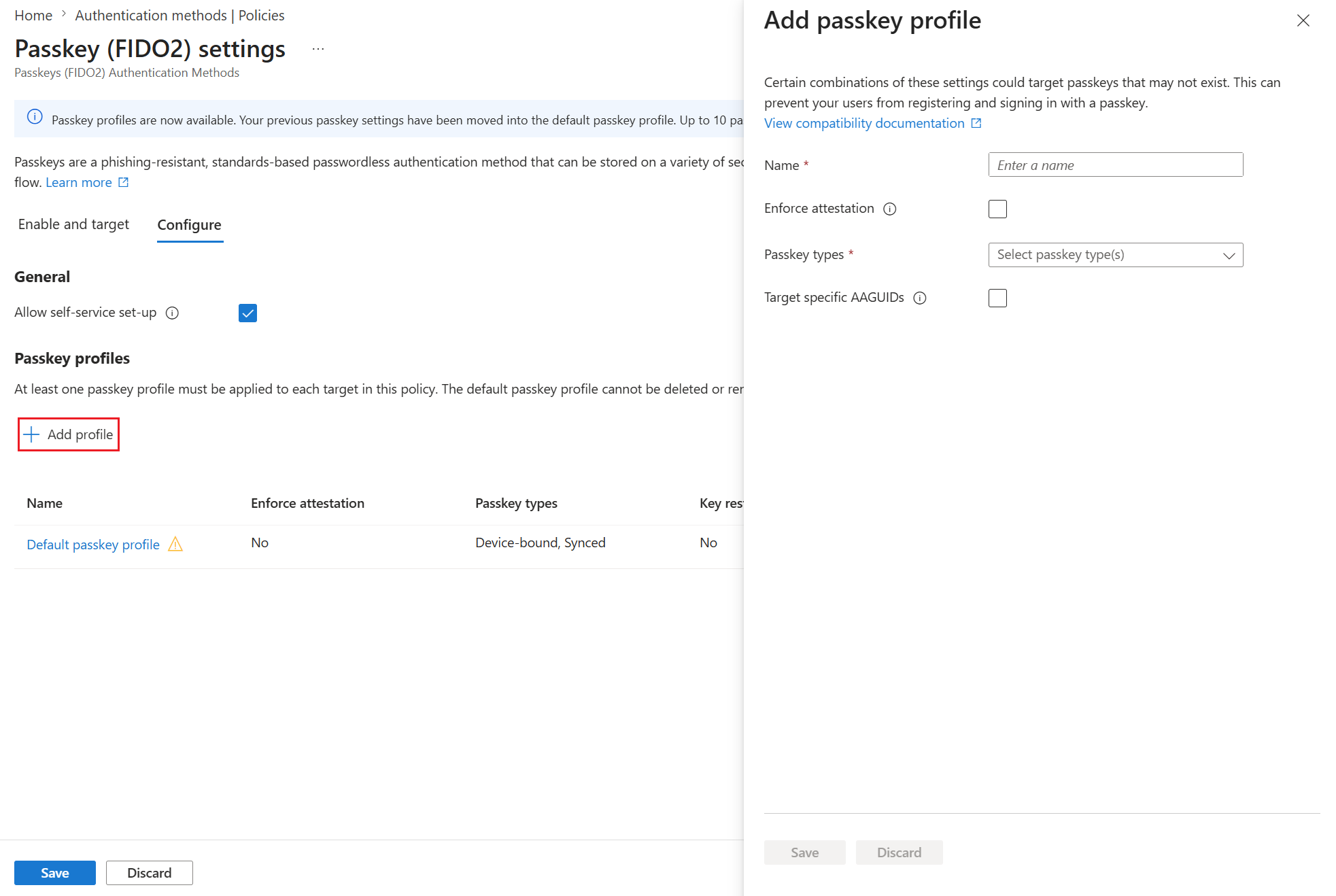
Image: adding a passkey profile with attestation, passkey type and AAGUID options. Source: Microsoft Learn, How to enable passkeys (FIDO2) in Microsoft Entra ID
Two behaviors matter for a future swap:
Key restrictions apply to sign-in, not just registration. Microsoft warns that if you remove a previously allowed AAGUID, "users who previously registered an allowed method can no longer use it for sign-in." That's the switch you'll use to retire old keys, so don't flip it by accident.
Attestation applies only at registration. Turning it on later doesn't block passkeys registered without it, so set it before admins enroll.
Which passkey type suits each group is a separate decision. Here the point is that your highest-risk accounts get attested, device-bound credentials whose model you know.
Step 4: Buy certified keys and enroll them against a verified person
For admins (and anyone else who gets a hardware key):
Buy FIDO Certified models that Entra ID accepts. Check the FIDO Certified Products directory and Microsoft's list of keys eligible for attestation. With attestation enforced, Microsoft requires FIDO2 certification (at any level) and metadata in the FIDO Metadata Service.
Issue two keys per admin and register both, with the second stored somewhere separate. A lost key with no backup means a help desk scramble, which is when social engineering works.
Onboard with a Temporary Access Pass, not a phone call. A TAP is a time-limited passcode that lets a user register a passkey without an existing MFA method. The default lifetime is one hour, and you can force one-time use tenant-wide. With a one-time TAP, the user has 10 minutes after sign-in to finish registering. Issue one only after verifying the person against ID, in person or on video. Our post on the fake "urgent passkey migration" call shows why attackers target that step.
For the internal pitch: the FIDO Alliance's Passkey Index 2026 (October 15, 2026) found passkeys in 36% of successful sign-ins across its consumer services (26% in 2025), succeeding 93% of the time versus 78% for traditional MFA. Those are consumer numbers.
Step 5: Run your own registration campaign
Instead of the Microsoft managed nudge with unlimited snoozes, take control under Entra ID > Authentication methods > Registration campaign, per Microsoft's registration campaign guide:
Sign in as at least an Authentication Policy Administrator and select Edit.
Set State to Enabled and Authentication method to Passkey (FIDO2).
Set Days allowed to snooze (0–14) and Limited number of snoozes to Enabled. That allows three snoozes, after which registration is required.
Include the group from step 1 that still relies on SMS or voice. Save.
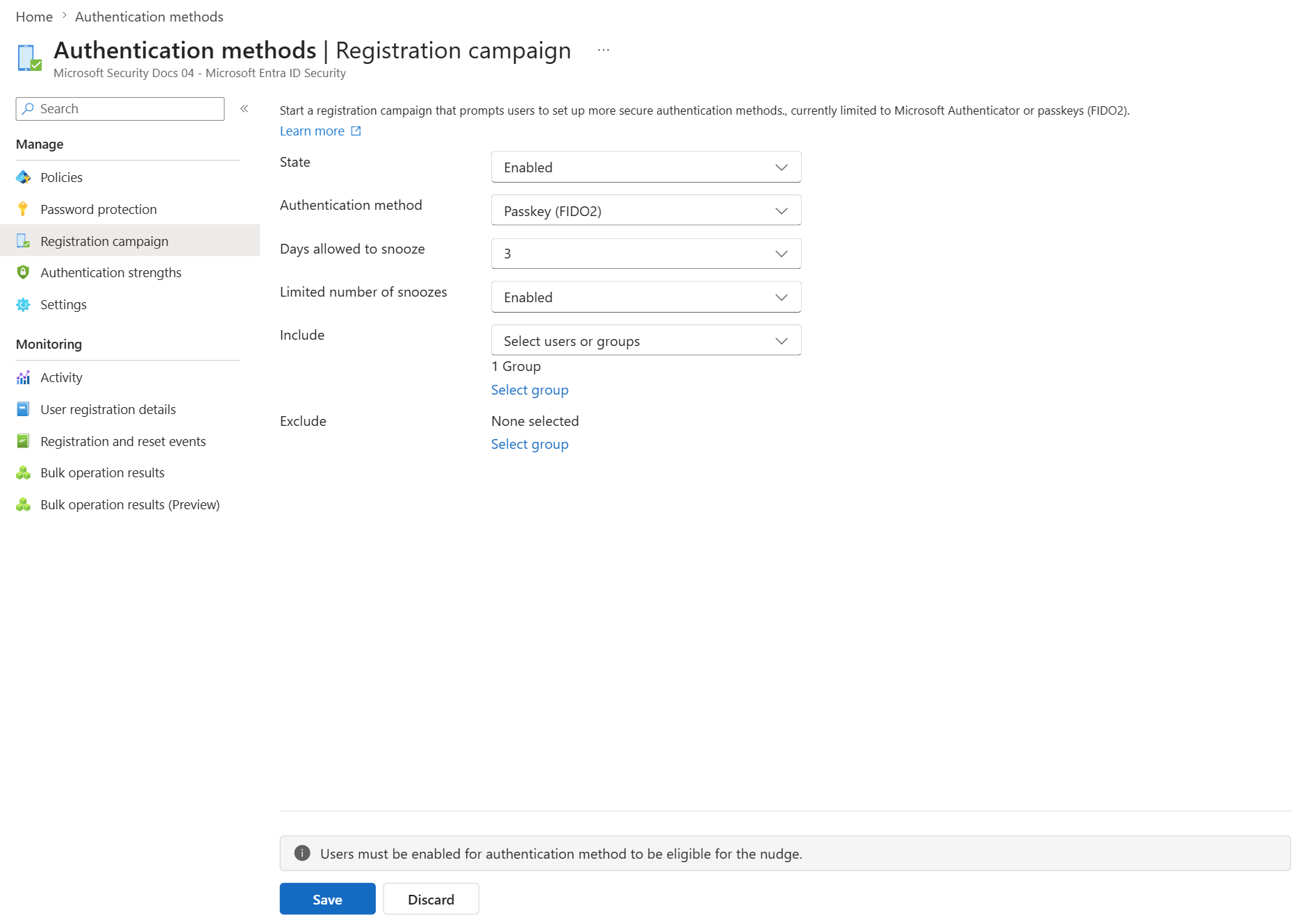
Image: an enabled passkey registration campaign with snooze settings and include targets. Source: Microsoft Learn, Run a registration campaign to set up a passkey or Microsoft Authenticator
Known gaps: Linux users and guests aren't nudged, native Android apps aren't supported yet, and a Conditional Access policy blocking the security-info page suppresses the nudge.
Step 6: Require phishing-resistant methods with authentication strengths
Registration doesn't remove the weaker methods. Enforcement does. Microsoft's built-in Phishing-resistant MFA authentication strength accepts Windows Hello for Business or platform credential, FIDO2 passkeys, and multifactor certificate-based authentication.
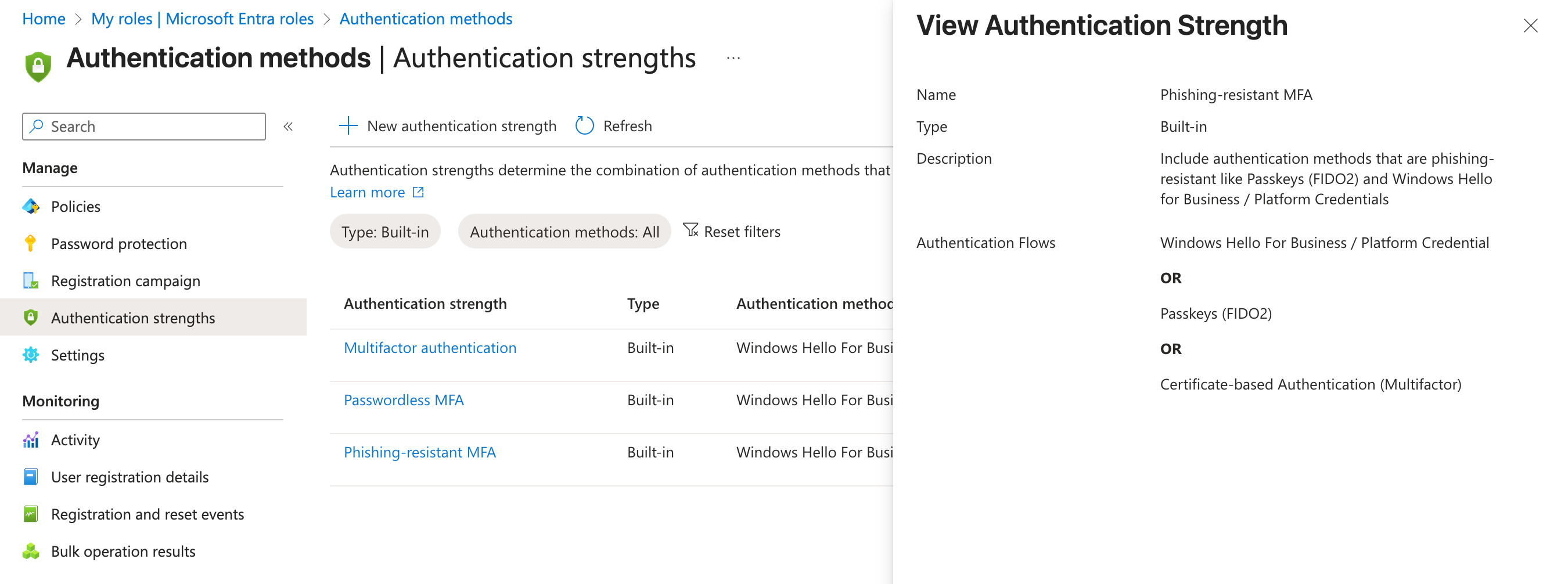
Image: the built-in Phishing-resistant MFA authentication strength and the methods it allows. Source: Microsoft Learn, Overview of Conditional Access authentication strengths
Start with admins, using Microsoft's policy for administrator roles:
Sign in as at least a Conditional Access Administrator and go to Entra ID > Conditional Access > Policies > New policy.
Users: include Directory roles, at least the 14 Microsoft lists (Global, Security, Exchange, SharePoint, User, Authentication, Conditional Access and Helpdesk Administrator among them). Exclude your emergency access accounts.
Target resources: All resources.
Grant: Require authentication strength > Phishing-resistant MFA strength.
Set the policy to Report-only, check the impact, then turn it On.
Microsoft warns that enabling this before admins register a phishing-resistant method "risks locking you out of your tenant." You also can't combine Require multifactor authentication with Require authentication strength in one policy. Excluded break-glass accounts need real monitoring; see our post on break-glass alerts that only fire once.
Then repeat for everyone, starting with the apps that matter most.
Step 7: Write and rehearse the key-replacement runbook
This step makes a future swap routine. Microsoft's FAQ notes there's "currently no automatic expiration for passkeys," so retiring one only happens when you do it. Write down, and test once with a volunteer:
Lost or compromised key: verify identity, delete the passkey in Users > Authentication methods, revoke sessions, issue a one-time TAP, register the backup or a replacement, and confirm the old one is gone. The TAP guide reminds users to remove old methods after recovery.
Planned model retirement, the dress rehearsal for post-quantum: pick an AAGUID you want to phase out, register replacements for affected users, then remove that AAGUID from the profile's allow list. Use the step 1 export to make sure nobody is left with only the retiring model.
Offboarding: delete passkeys as part of account disablement, and get hardware keys back.
Edge cases: Microsoft notes that if a user's UPN changes, their passkey can't be updated. They have to delete it and register a new one. Guests can't register passkeys at all.
When Entra ID and authenticator vendors ship ML-DSA support, the post-quantum swap is this runbook, step 2, run across your whole tenant.
Step 8: Ask your vendors the right questions
In November 2026, CISA, NSA and Australia's ACSC published joint guidance, Post-quantum questions to ask your vendors, with vendor-neutral questions for procurement, renewals and vendor assurance. An identity-focused list in the same spirit for your key vendor, identity provider and VPN or firewall maker:
Which NIST algorithms (ML-DSA, ML-KEM, SLH-DSA) will you support, in which product version, and on what date will they be generally available?
For security keys: will current models get ML-DSA through firmware, or will we need new hardware? Will the new model be FIDO Certified and in the FIDO Metadata Service?
For the identity provider: when will you accept ML-DSA passkeys (COSE -48/-49/-50), and how will you help admins migrate users from ES256 credentials?
For VPN, firewall and remote access: do you support TLS 1.3 or IKE with hybrid ML-KEM key exchange today, and is it on by default?
Is it in the base license? What's hard-coded or hardware-bound and can't be updated?
Record the answers next to your step 1 inventory. "We're monitoring PQC" is an answer too, worth remembering at renewal.
A worked example: a 25-person firm
A composite example (an illustration, not a specific client): a 25-person accounting firm on Microsoft 365 Business Premium, which includes Entra ID P1. The step 1 export shows 9 users on SMS, 3 admins on push, and 6 users who registered synced passkeys after the September nudge.
Week 1: buy two FIDO Certified keys per admin, create the attested admin profile, enroll each admin with a one-time TAP after an in-person check.
Week 2: run the admin Conditional Access policy in report-only, then turn it on.
Weeks 2–3: run an Enabled, limited-snooze campaign for the nine SMS users.
Week 4: require phishing-resistant MFA for Exchange Online and SharePoint, then rehearse the runbook once with a spare key. Send the step 8 questions to the VPN and practice-software vendors.
Six keys and a few days of admin time leave the firm with phishing-resistant sign-in for admins and its key apps, a list of every authenticator model in use, and a tested way to replace them. When new algorithms ship, it reruns step 7 instead of starting a project.
Key takeaways
A large quantum computer would break today's public-key cryptography, including the ECDSA keys in current passkeys. NIST's replacements (ML-KEM, ML-DSA, SLH-DSA) were published in August 2024.
NIST IR 8547 (final, October 2026) deprecates RSA and ECC after 2030 and disallows them after 2035. US federal high-priority systems face end-of-2030/2031 deadlines; Microsoft targets PQC by 2029.
Harvest-now-decrypt-later makes TLS and VPN key exchange urgent, mostly your vendors' job. Authentication has no harvest risk, but NIST says it must switch immediately once quantum computers can break it.
Passkeys aren't quantum-safe today. They offer agility: WebAuthn negotiates the algorithm, ML-DSA has COSE identifiers (RFC 9964), and FIDO's draft server requirements recommend them. Passwords, SMS and push can't be upgraded.
The swap means new credentials, and possibly new hardware. Entra ID doesn't document ML-DSA passkey support yet, so inventory your authenticators by model and AAGUID now.
In Entra ID: check what the September 1 auto-enablement did, set passkey profiles deliberately, enroll admins on certified keys with a TAP, run a limited-snooze campaign, and enforce the Phishing-resistant MFA strength.
A rehearsed key-replacement runbook is your post-quantum migration plan.
Don't spend 2026 on a production post-quantum CA or unverified "quantum-safe" add-ons. Ask vendors specific, dated questions instead.
Official sources
NIST IR 8547: Transition to Post-Quantum Cryptography Standards (final, October 2026)
NIST: First three finalized post-quantum standards (August 2024)
FIDO Alliance: Server Requirements (WebAuthn Level 3 and CTAP 2.3), review draft
FIDO Alliance: Addressing FIDO Alliance's Technologies in a Post Quantum World
Microsoft Security Blog: Accelerating the quantum-safe timeline (June 30, 2026)
Microsoft: Post-quantum cryptography APIs generally available on Microsoft platforms
Microsoft Learn: Post-quantum cryptography in AD CS overview
Microsoft Learn: Passkeys (FIDO2) authentication method in Microsoft Entra ID
Microsoft Learn: How to enable passkeys (FIDO2) in Microsoft Entra ID
Microsoft Learn: Microsoft Entra ID attestation for FIDO2 security key vendors
Microsoft Learn: Passkeys by default and retirement of Microsoft-provided SMS and voice
Microsoft Learn: Run a registration campaign to set up a passkey or Microsoft Authenticator
Microsoft Learn: Overview of Conditional Access authentication strengths
Microsoft Learn: Require phishing-resistant MFA for administrator roles
Microsoft Learn: Get started with a phishing-resistant passwordless deployment
About IAMPathway
IAMPathway publishes practical guides on Identity & Access Management: Microsoft Entra ID, governance, identity threats, Application Governance and AI Governance. Browse all topics or read the glossary.