- Oct 26
Your Users Can Create AI Agents in Entra ID Starting November 4. Here's the One Setting to Check Today
- IAMPathway
- Microsoft Entra ID, Application Governance, AI Governance
Most identity teams switched off "Users can register applications" years ago. The reasons were shadow apps, credentials nobody owned, and consent sprawl. A new default brings the same risk back with an AI label on it.
Microsoft announced in Message Center post MC1506733 ("Action may be required: Review who can create agents in Microsoft Entra," published October 13, 2026) that starting November 4, 2026, default users in Microsoft Entra will be able to create agent blueprints. That includes users who don't hold any built-in or custom Entra role. It applies unless an administrator turns off a new setting first. Microsoft expects the worldwide rollout to start in early November and finish by late November 2026.
You can decide today. If you change the toggle now, your choice takes effect when the rollout reaches your tenant. This post covers what's changing, how to check the setting, and how to govern agent creation whichever way you decide.
What an agent identity blueprint actually is
Microsoft Entra Agent ID treats AI agents as their own identity type. The agent identity blueprint is the parent definition: Microsoft says a blueprint is "used to create agent identities and request tokens using those agent identities". Credentials such as federated identity credentials, certificates, or secrets are configured on the blueprint. Individual agent identities are then created from it.
If you know app registrations and service principals, Microsoft's own audit log documentation draws the comparison for you. A blueprint is "analogous to an app registration", and an agent identity is analogous to a service principal. Creating a blueprint even shows up in the audit log as an Add application event.
Ownership matters here. According to Microsoft Learn, whoever creates a blueprint is automatically made owner of both the blueprint and its blueprint principal. Owners can then create agent identities from that blueprint without any Agent ID role. So once a user can create a blueprint, they can keep creating agents from it.
What changes on November 4, and what doesn't
Per MC1506733 and the Microsoft Learn guidance on restricting who can create agents:
What changes
Default users can create new agent blueprints unless the setting is set to No.
With the setting set to No, supported administrators and users with the Agent ID Developer role can still create blueprints.
What doesn't change (according to the Message Center post)
Existing agent blueprints aren't changed or removed.
Who can create agent identities from existing blueprints stays the same.
The setting doesn't stop an app or an agent from creating identities.
Creation requirements in platforms such as Microsoft Foundry or Security Copilot, like licenses and Azure subscriptions, aren't affected.
One detail catches many teams out: the new setting is independent of "Users can register applications." Even if you locked down app registrations years ago, blueprints aren't blocked. Microsoft explicitly says to review both settings separately.
A note on the setting's name
Microsoft Learn and MC1506733 call the toggle "Users can create agent blueprints." Some admins report that the Entra admin center shows it as "Users can register agent identity blueprints." The label may differ depending on your tenant and when you look. Look for either name under Default user role permissions, which is next to "Users can register applications."
Step by step: check and change the setting
Microsoft's documented steps (from MC1506733 and Microsoft Learn):
Sign in to the Microsoft Entra admin center as at least a Cloud Application Administrator.
Browse to Entra ID > Users > User settings.
Under Default user role permissions, find Users can create agent blueprints (it may appear as "Users can register agent identity blueprints").
Set it to No to restrict creation, or leave it on Yes if you've decided to allow it.
Select Save.
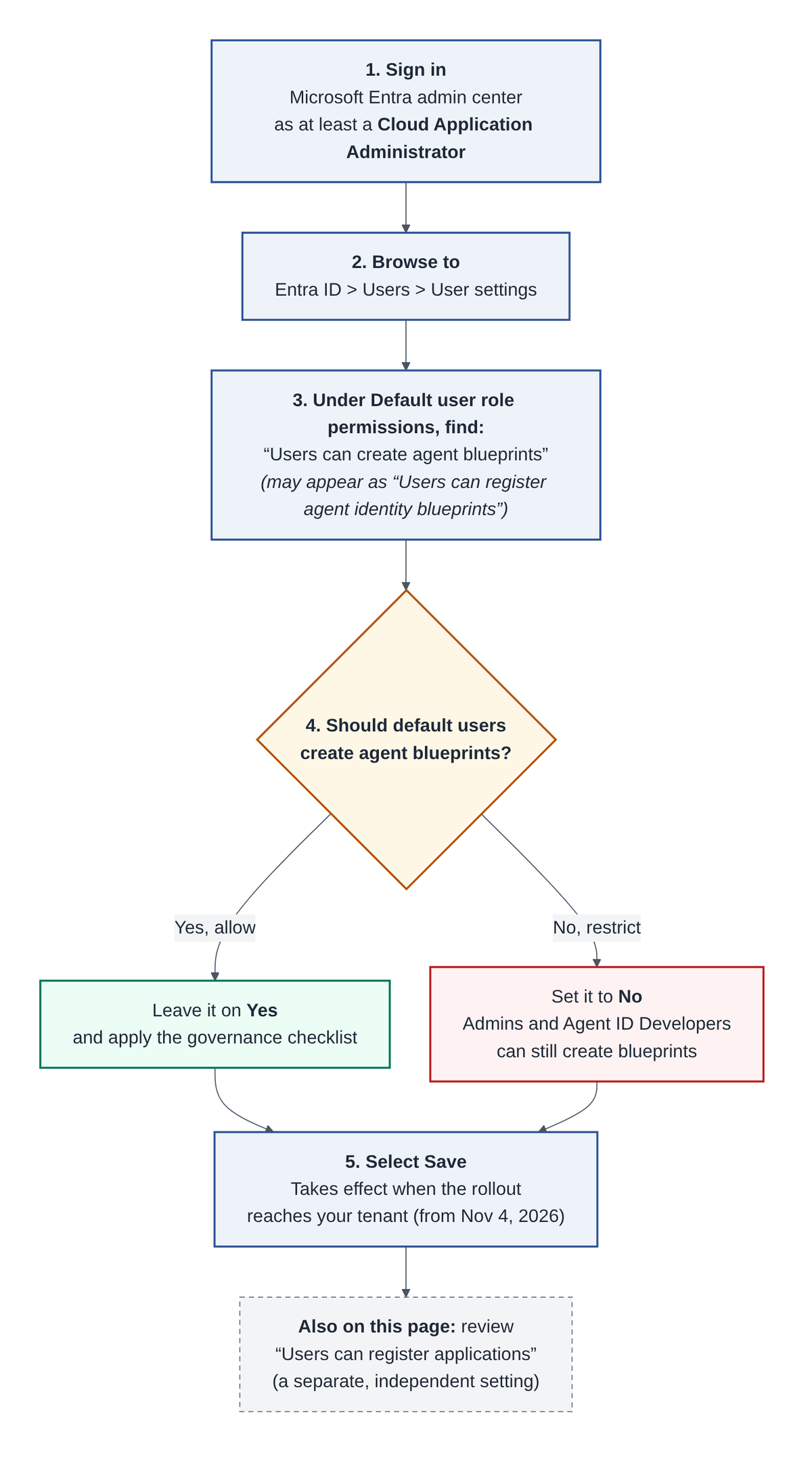
Figure 1: Checking the agent blueprint setting in the Microsoft Entra admin center. The label may read "Users can register agent identity blueprints" in your portal.
While you're on that page, check Users can register applications as well. They're separate controls, and you should be able to explain your choice for each one.
Programmatic option: Community write-ups describe a beta Microsoft Graph property on the tenant authorization policy for this setting. At the time of writing, we couldn't find it in Microsoft's published Graph reference, so we haven't included the call here. If you script tenant baselines, confirm against the official authorizationPolicy documentation before automating.
Should you turn it off? Arguments on both sides
For setting it to No: This is the "users can register apps" decision again. Every blueprint is a credential-bearing, non-human identity with an owner who can create more agents from it. If any user can create one, you lose control over who builds agents, how they authenticate, and who answers for them. That's exactly the kind of risk the OWASP Top 10 for LLM Applications describes as Excessive Agency: agents with more functionality, permissions, or autonomy than they need.
For leaving it on (or not only turning it off): Blocking a sanctioned path doesn't make demand go away. If people can't build agents inside Agent ID, some will build them in places you can't see. Agents created through Agent ID at least show up as a distinct identity type in your directory, with owners, sponsors, and agent-aware audit and sign-in logs.
For most organizations, the practical answer is "No by default, plus a fast, documented path to Yes." Restrict the toggle, and give builders a simple way to request what they need.
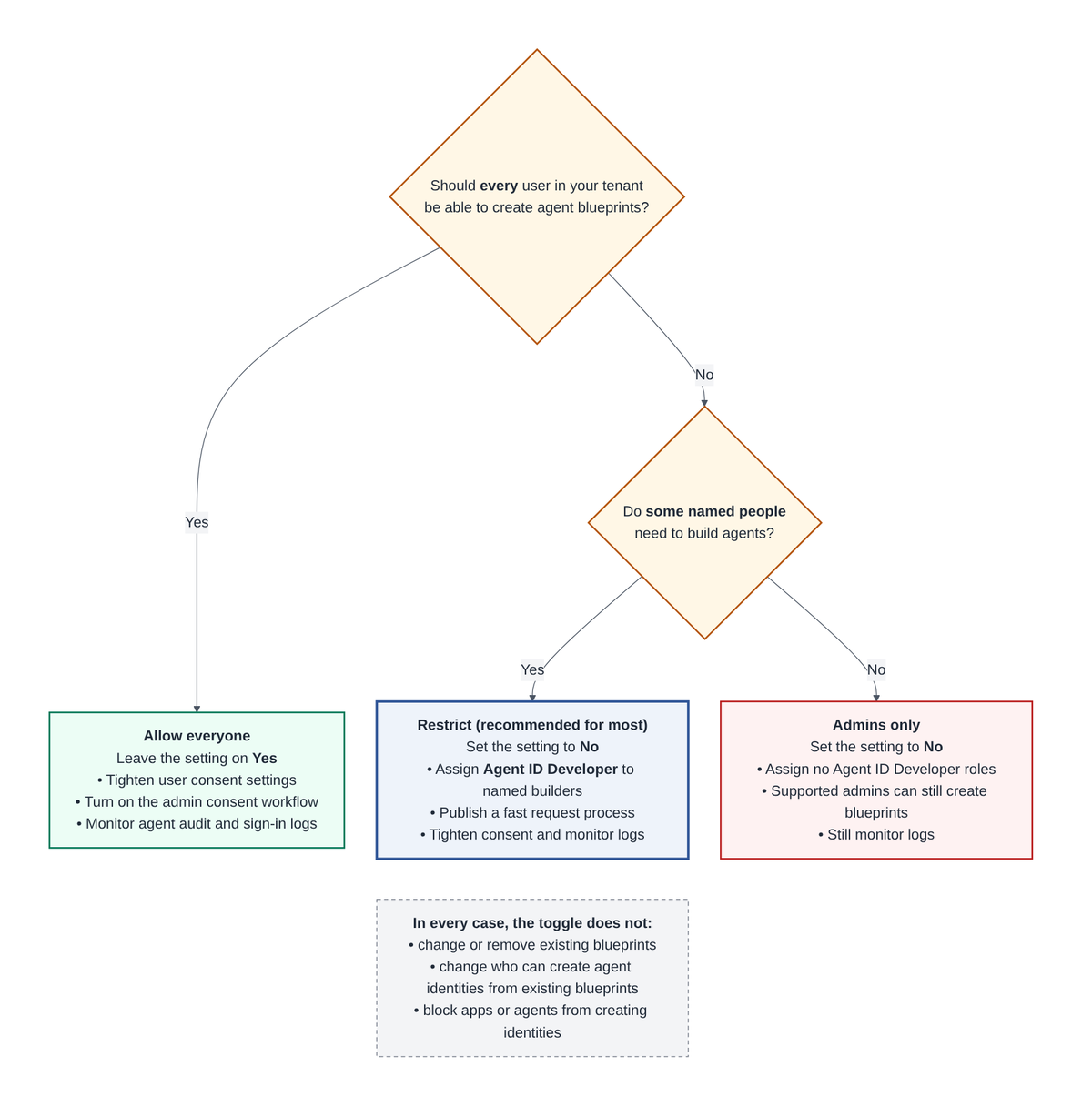
Figure 2: Allow everyone, restrict to named builders, or admins only. The toggle doesn't affect existing blueprints or stop apps and agents from creating identities.
Governing agent creation: a practical checklist
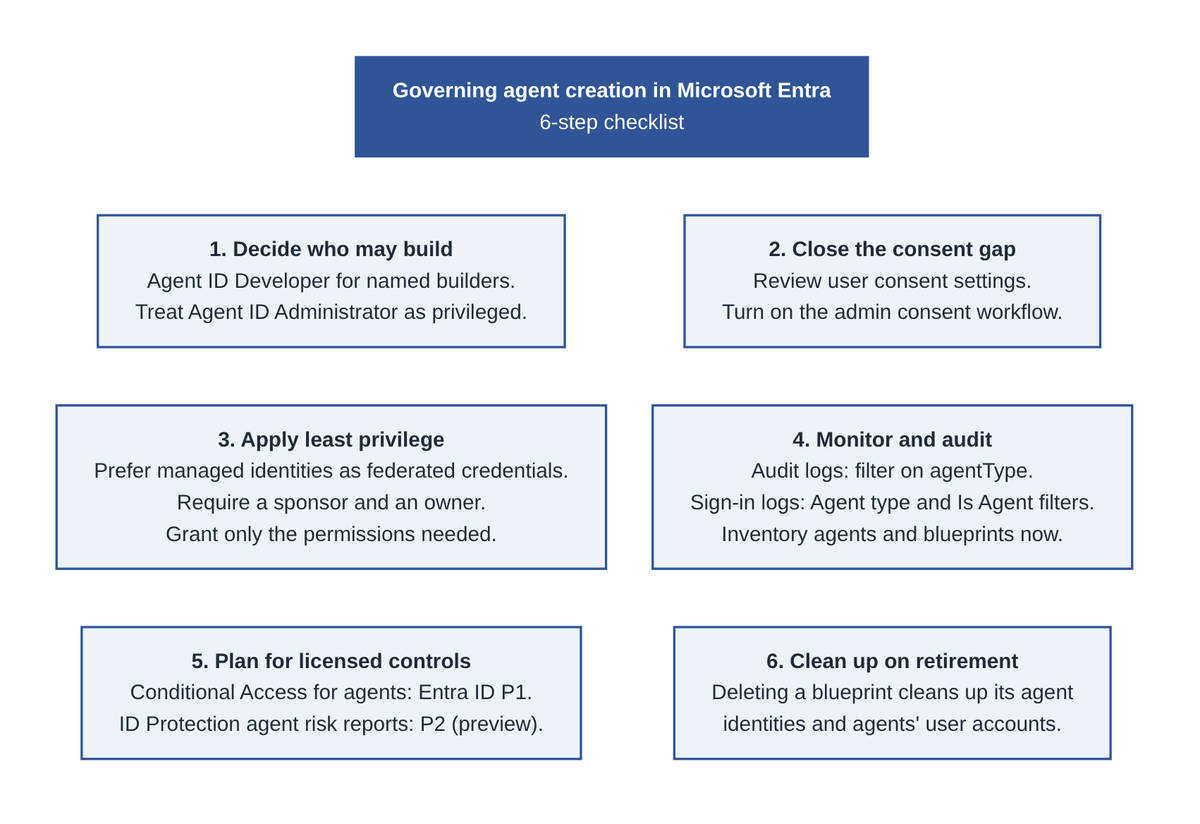
Figure 3: The six-step governance checklist at a glance. Details for each step follow below.
1. Decide who may build agents
Assign the Agent ID Developer role to named builders, not to everyone. Per the built-in roles reference, this role lets a user create a blueprint and its blueprint principal, and makes them owner of both.
Treat Agent ID Administrator as a privileged role. It manages the full lifecycle of agent identities, blueprints, and agent users across the tenant. Microsoft Learn notes it is required to add a secret or certificate credential to a blueprint, while Agent ID Developer can configure federated identity credentials.
Publish a short request process (form, ticket, or approval) so teams aren't tempted to build around you.
2. Close the consent gap
Being able to create an agent isn't the only question. What it can reach depends heavily on consent. By default, all users can consent to applications for permissions that don't require admin consent, and Microsoft notes that everyone can consent to apps and agents accessing company data on their behalf.
Review Enterprise apps > Consent and permissions (the exact navigation differs slightly between Microsoft articles). Microsoft recommends allowing user consent only for apps from verified publishers, or turning user consent off entirely.
Turn on the admin consent workflow so users can request access instead of getting stuck.
3. Apply least privilege to blueprints
Prefer managed identities as federated identity credentials for production. Microsoft recommends this and says secrets and certificates aren't recommended for production.
Require a sponsor (an accountable person or supported group) and a real owner on every blueprint. Microsoft requires a sponsor when a blueprint is created.
Grant only the permissions the agent needs, and review them regularly. This follows the least-privilege principle in NIST SP 800-53 AC-6.
4. Monitor and audit
In the audit logs, blueprint creation appears as Add application and agent identity creation as Add service principal. Filter on the
agentTypeproperty (for exampleagenticAppfor blueprints) to separate agent activity from normal app events.In Entra ID > Monitoring & health > Sign-in logs, use the Agent type and Is Agent filters to review agent sign-ins.
Take an inventory now under Entra ID > Agents > Agent identities and Agent blueprints, so you have a baseline before November 4.
Remember the toggle doesn't stop apps or agents from creating identities. Review which applications hold agent-related Microsoft Graph permissions.
5. Plan for controls that need licenses
Microsoft's management guidance notes that Conditional Access for agents requires Microsoft Entra ID P1, and ID Protection risk reports for agents require P2 during preview. Check what your tenant has before you build a governance plan around those controls.
6. Clean up when agents retire
Deleting a blueprint triggers cleanup of all its child agent identities and agents' user accounts. Make deletion part of your decommissioning process.
Key takeaways
Deadline: Starting November 4, 2026 (rollout finishing by late November), default users can create agent blueprints unless you turn the setting off.
Separate switch: The new toggle is independent of "Users can register applications." Locking down apps doesn't lock down agents.
Find it: Entra ID > Users > User settings > Default user role permissions. It's labeled "Users can create agent blueprints" in Microsoft's docs and may read "Users can register agent identity blueprints" in your portal.
Owners create agents: Blueprint creators become owners, and owners can create agent identities without an Agent ID role.
Don't just block: Pair the toggle with the Agent ID Developer role for named builders, tight user consent settings, an admin consent workflow, and regular log reviews.
Sources
Microsoft 365 Message Center, MC1506733: "Action may be required: Review who can create agents in Microsoft Entra" (October 13, 2026). View it in your tenant's Microsoft 365 admin center Message center.
Microsoft Learn: Delegate application and agent management administrator permissions (Restrict who can create applications and agents)
Microsoft Learn: Create an agent identity blueprint
Microsoft Learn: Manage agent identities in your organization
Microsoft Learn: Microsoft Entra Agent ID logs
Microsoft Learn: Microsoft Entra built-in roles
Microsoft Learn: Default user permissions
Microsoft Learn: Configure how users consent to applications
Microsoft Learn: Configure the admin consent workflow
Microsoft Graph: authorizationPolicy resource type (beta)
OWASP: LLM06:2025 Excessive Agency
About IAMPathway
IAMPathway publishes practical guides on Identity & Access Management: Microsoft Entra ID, governance, identity threats, Application Governance and AI Governance. Browse all topics or read the glossary.