- Nov 2
Your AI Agents Are Insiders Now: Give Each One an ID, a Sponsor, and a Kill Switch
- IAMPathway
- Microsoft Entra ID
For twenty years, insider risk meant people: the admin with too much standing access, the contractor whose account outlived the contract, the employee who clicked a link. On October 19, 2026, Microsoft added a new kind of insider to that list. In a Microsoft Security Blog post titled "Agents are your newest insiders. Security must move at their speed.", Nadim Abdo, Corporate Vice President for Identity and Network Access, argued that agents bring insider risk because of the access we hand them. That's not because they're malicious. It's because they "can make mistakes, be manipulated, or be compromised," and they do it at machine speed.
If you work in identity, none of the principles in that post will surprise you. Least privilege, accountable ownership, continuous evaluation, and a fast way to cut off access are the same things we've applied to people for years. What's new is that Microsoft is building them into Entra for agents, and a lot of it is still announced or in preview.
This post separates the two. First, what Microsoft announced and what it means. Then the controls you can actually configure today, with admin paths taken from Microsoft Learn, what they cost, and where they don't reach.
What Microsoft announced on October 19
The blog post frames the problem with an expense-approval agent. The agent needs to read expense submissions, check policy, and approve routine reimbursements, but Microsoft says it "should not inherit every permission of the employee who sponsors it." If the agent later hits a prompt injection in a document and tries something outside its task, the system should respond in proportion: keep safe reads, block writes, narrow what it can reach, require human approval for a consequential step, or stop it.
To get there, Microsoft described several pieces:
Project Perception and Guardian Agents. Perception is Microsoft's umbrella for security that runs alongside agents. Guardian Agents are agents that help security teams investigate why an agent's risk changed and recommend or apply containment, inside boundaries that people set.
Broader discovery. Microsoft says it's expanding discovery to 35 more types of local agents, for a total of 60, including Claude Code, OpenAI Codex and GitHub Copilot, feeding a single registry.
New Entra Agent ID identity types for local and previously unknown agents found by security sensors, so those agents can become policy targets too.
Dynamic Permissions. Agents start with no authority, or the least needed, and get permissions scoped to the task and limited in time. Organization-wide policy sets the outer boundary, including preventing an agent from getting authority its user doesn't have.
Dynamic Agent Risk. This is a continuously updated risk assessment built from identity, data, endpoint, cloud, network and runtime signals, plus the agent's own activity.
Dynamic Conditional Access for agents. This extends Conditional Access so that a change in risk can trigger graduated responses, not just allow or block.
A word of caution. The blog post describes these as things Microsoft is "introducing." It doesn't give general availability dates, and I couldn't find GA dates on Microsoft's documentation pages either. Treat Dynamic Permissions, Dynamic Agent Risk, Dynamic Conditional Access and Guardian Agents as announced direction, not features you can switch on today. Several of the building blocks underneath them do exist now, though, and that's where the rest of this post goes.
The most useful line in the post for identity people is the design principle behind all of it: "surround non-deterministic intelligence with deterministic controls." In other words, don't ask the model to police itself. Put identity, permissions and policy outside the model, where it can't argue its way past them.
Why this is an identity problem, not just an AI problem
The independent security community reached the same conclusion from the other direction. The OWASP Top 10 for LLM Applications entry on Excessive Agency (LLM06:2025) says damaging agent actions usually come from three root causes: excessive functionality, excessive permissions, and excessive autonomy. Its mitigations read like an identity checklist. They include minimizing the permissions agents have on other systems, running actions in the user's own context with the minimum OAuth scope, requiring human approval for high-impact actions, and enforcing authorization in downstream systems "rather than relying on an LLM to decide if an action is allowed or not."
Two recent research write-ups show what happens when that goes wrong.
A prompt that turned into a cloud credential. In AgentCorruption (October 8, 2026), Zenity Labs described how an agent deployed on AWS Bedrock AgentCore could be prompted to call the instance metadata service and hand back the temporary credentials of its execution role. Zenity says the default role at the time wasn't scoped to that one agent. It covered AgentCore resources across the whole account and region, so one exposed agent could be used to invoke other agents, read their conversations, plant memories, and pull secrets. Zenity says AWS has since substantially hardened the default role. AWS's statement in the write-up says the behavior was documented and expected and recommends granting execution roles only the permissions their agents need. This is an AWS case, not an Entra one, but the lesson carries over: the prompt injection opened the door, and the over-broad identity decided how far the attacker got.
A poisoned skill in Microsoft 365. PromptArmor reported that a prompt injection hidden in a Copilot Cowork skill file could make the agent send the user a Teams message carrying pre-authenticated download links to the user's files, which leaked when the message was opened. PromptArmor says the chain worked in 5 out of 5 trials and that the agent "operates with the users' Microsoft permissions." Its main advice was to reduce oversharing, because the agent can reach whatever the user can. (Check Microsoft's current guidance for this product before you act on it, since vendors often change behavior after research like this is published.)
These two cases show the two shapes of agent access you have to plan for. One agent used its own identity (an execution role). The other acted on behalf of a user with the user's permissions. Entra treats those very differently, and that's the first thing to get right.
Step 1: Work out which identity each agent actually uses
Microsoft Learn's Conditional Access for agents page describes three access patterns, and each one is controlled by a different policy target:
If the agent works for a signed-in user: the access pattern is on-behalf-of (delegated), and Conditional Access targets the user.
If the agent works with no user present: the access pattern is app-only (client credentials), and Conditional Access targets the agent identity or its blueprint.
If the agent has its own user account, mailbox or Teams presence: the access pattern is agent user, and Conditional Access targets the agent's user account.
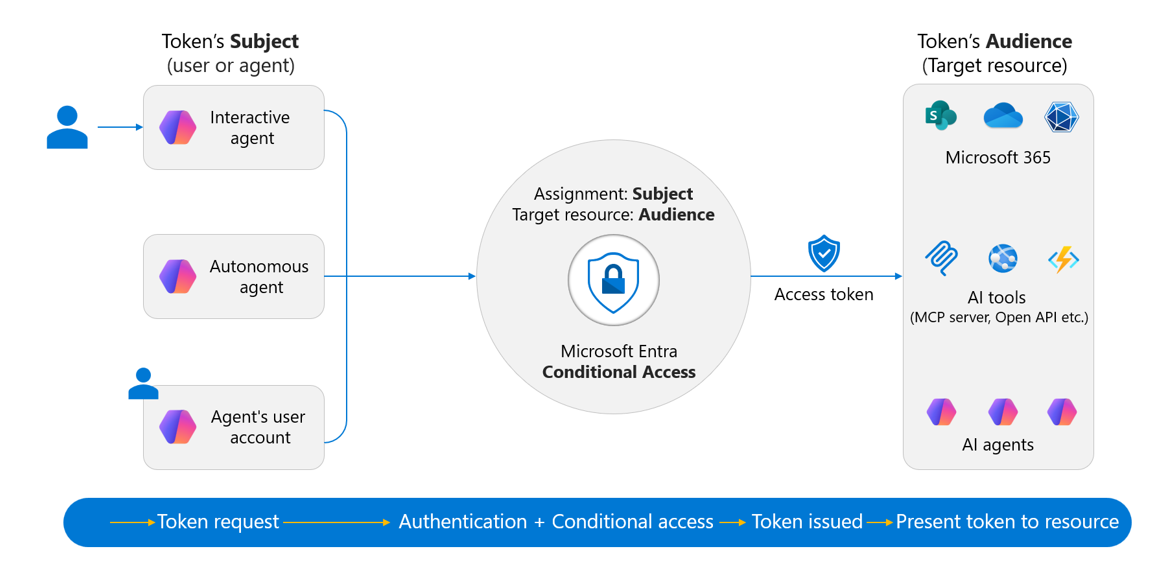
How Conditional Access evaluates agent token requests by subject and audience. Image: Microsoft, from Conditional Access for Agents in Microsoft Entra on Microsoft Learn.
This matters because the patterns don't overlap. Microsoft says that in the on-behalf-of flow the user is the token subject, so "selecting an agent identity as the policy subject doesn't cover agent requests made on behalf of the user." It also says a policy that targets an agent identity doesn't apply to that agent's user account, and that policies scoped through the "Users" assignment don't apply to agent user accounts either. If an agent uses more than one pattern, you need a separate policy for each.
So the Copilot Cowork scenario above is governed mostly by your user policies and your data permissions, not by agent policies. An autonomous agent running a nightly job is governed by agent identity policies. Microsoft's ID Protection for agents page makes the same split for risk: in on-behalf-of flows, risky activity "is attributed to the user rather than the agent."
What to do: For each agent you know about, write down which of the three patterns it uses. That one column tells you which policies, logs and risk reports apply to it.
Step 2: Find your agents and give every one a sponsor
You can't contain what you can't list. In the Microsoft Entra admin center, browse to Entra ID > Agents > Agent identities. Per View and filter agent identities, the list shows agent identity objects and agents that use a plain service principal. Use Choose columns to add Owners and Sponsors and Uses agent identity. A "No" in that last column means the agent is running on a regular service principal, outside the Agent ID model.
Microsoft's best practices for Agent ID are blunt about that: "Don't create AI agents as plain app registrations or service principals outside the Agent ID framework." Those agents miss out on sponsor accountability and the agent-specific lifecycle controls.
Next, check accountability. Entra Agent ID splits it into roles, described in Administrative relationships in Microsoft Entra Agent ID:
Sponsors are the business people accountable for why the agent exists. At least one is required for each agent identity and blueprint. Sponsors can disable or soft-delete an agent and change its sponsors, but they can't change its technical settings or re-enable it.
Owners are the technical admins. They're optional, and they can manage credentials and configuration, add owners and sponsors, and re-enable or restore agents.
Managers place the agent in the org chart and can request access packages for it.
Microsoft's Manage agent identities page adds a detail that leaver processes will appreciate: if a sponsor leaves the organization, Entra automatically reassigns sponsorship to that sponsor's manager.
To add or fix a sponsor:
Sign in to the Microsoft Entra admin center as an Agent ID Administrator or an owner of the agent identity.
Browse to Entra ID > Agents > Agent identities and select the agent.
Under Access, select Owners and sponsors.
Select Add > Add sponsor, choose the user or group, and select Add.
Two gotchas from Microsoft's docs. Sponsors can be users, dynamic membership groups, or Microsoft 365 groups, but not assigned security groups or role-assignable groups. And when a user creates an agent through a delegated request without naming a sponsor, that user becomes the sponsor automatically, so your "sponsor" may simply be whoever happened to click Create. (Steps source.)
Tradeoff: Group sponsors survive staff changes better, but "everyone in the group can disable this agent" may be broader than you want. For an agent that touches money or customer data, I'd name one person plus a small Microsoft 365 group as backup.
Step 3: Allow only approved agents to get tokens
The closest thing to "start with no permissions" you can build today is a Conditional Access policy that blocks every agent identity except the ones you've reviewed. Microsoft documents it in Secure autonomous agents with Conditional Access. The quick version uses the object picker:
Sign in to the Microsoft Entra admin center as at least a Conditional Access Administrator.
Browse to Entra ID > Conditional Access > Policies and select New policy.
Give it a clear name, such as
AGENTS - Block all except approved.Under Assignments, select Users, agents or workload identities. Under What does this policy apply to?, select Agents. Under Include, select All agent identities.
Under Exclude, choose Select individual agent identities and pick the approved blueprints or agent identities.
Under Target resources > Include, select All resources (formerly 'All cloud apps').
Under Access controls > Grant, select Block.
Set Enable policy to Report-only, then select Create.
After you've reviewed policy impact and the report-only results, switch it to On.
Microsoft's recommended version scales better. You create a custom security attribute, for example an attribute set called AgentAttributes with an attribute AgentApprovalStatus holding values like New, In_Review and IT_Approved, and then exclude agents "based on attributes" instead of by name. New agents are blocked until someone sets the attribute. That turns approval into a governed step instead of a policy edit.
Two things to expect:
Block is the only control. Per Target agents in Conditional Access policies, block access is the only option for agent identities "because there's no interactive remediation possible." Agents can't do MFA.
Check your existing user policies. Microsoft's best practices say to audit broad policies like "All users must use MFA" so they don't accidentally break agent flows, and to build dedicated agent policies instead.
A related tip from Microsoft's best practices: apply policy at the blueprint level. A policy that targets a blueprint covers every agent identity created from it, including future ones, and disabling a blueprint blocks all of its agent identities at once. That's your fleet-wide kill switch.
Step 4: Turn on agent risk, and block high-risk agents
This is the piece that exists today and points toward "Dynamic Agent Risk." ID Protection for agents flags agents that behave strangely. Detections include:
Sign-in spike: many more sign-ins than usual, which can point to automation or an attack toolkit.
Unfamiliar resource access: reaching for resources the agent doesn't normally touch.
Failed access attempt: trying resources it isn't authorized for, which can mean a stolen token is being replayed.
Suspicious credential usage: new credentials added to a blueprint and then used.
Directory reconnaissance and early-life malicious activity in newly created agents.
Microsoft notes that all agent risk detections are currently offline, meaning they're calculated after the fact rather than in real time. A "learning mode" also suppresses behavioral alerts for agents without enough history, while a separate detection still watches for clearly malicious early behavior.
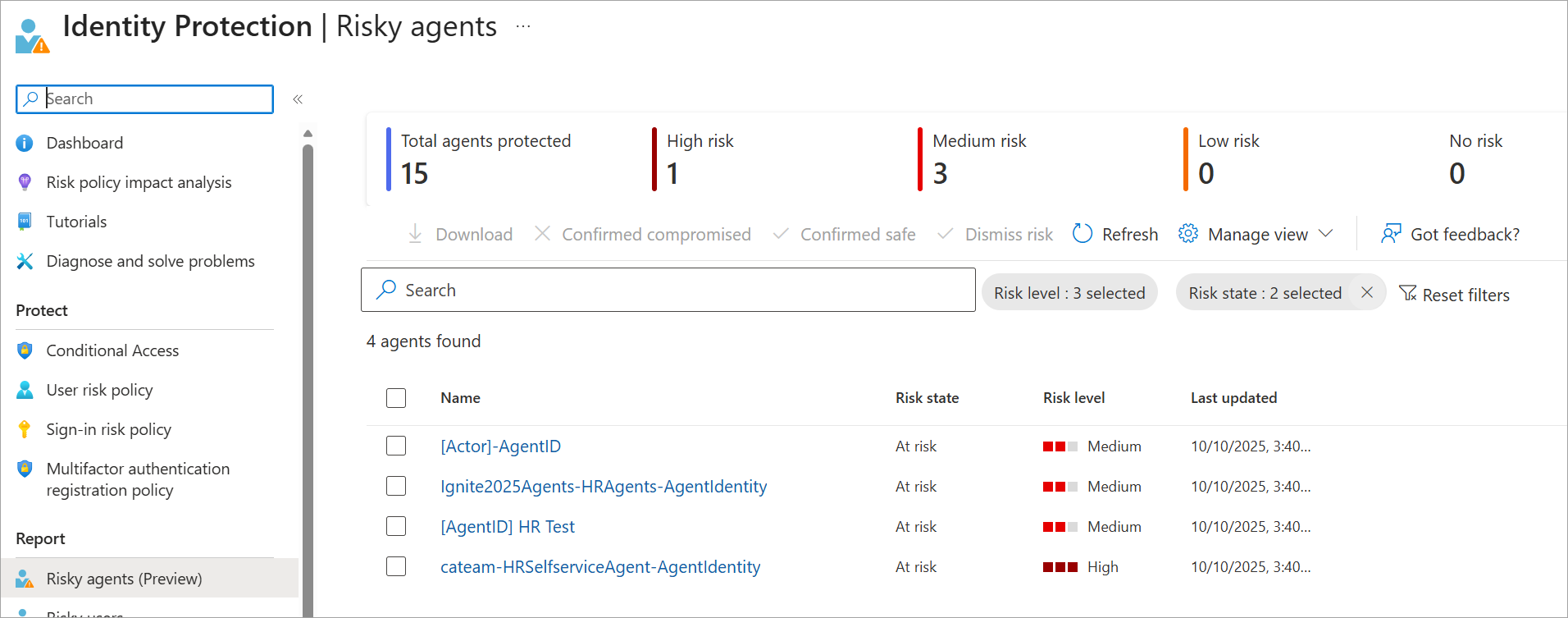
The Risky agents report in Microsoft Entra ID Protection. Image: Microsoft, from ID Protection for Agents on Microsoft Learn.
From the report you can confirm compromise (which sets risk to High and triggers any block-on-high policy), confirm safe, dismiss risk, or disable the agent. Viewing the report needs Security Administrator, Security Operator or Security Reader.
To act on risk automatically, Microsoft documents a block policy:
In Entra ID > Conditional Access > Policies, select New policy.
Under Assignments, choose Users, agents or workload identities > Agents > All agent identities.
Under Target resources > Include, select All resources.
Under Conditions > Agent risk (Preview), set Configure to Yes and select High.
Under Access controls > Grant, select Block.
Start in Report-only, review, then turn it On.
This is coarse compared with Microsoft's "preserve reads, block writes" vision. Today it's block or don't. Still, cutting off a compromised autonomous agent automatically is a big improvement over waiting for someone to notice.
Step 5: Shrink what each agent can do, whatever your license
Conditional Access decides whether an agent gets a token. Permissions decide what it can do with one. Microsoft's best practices on this are licensing-free and worth adopting now:
One identity per agent. Don't share identities across agents, so you can disable one without breaking the rest.
Delegated over application permissions when a user is present, so the user's own access and policies apply. Microsoft says to "avoid granting app permissions when delegated permissions would suffice."
Managed identities or certificates in production. Use client secrets only for development, and store keys in Key Vault or an HSM.
Agent user accounts only when needed, for example when the agent truly needs a mailbox or Teams presence, because they add licensing and policy complexity.
Time-bound access through access packages, with sponsors attesting every 6 to 12 months that each agent is still needed. Quarterly, look for agents with missing sponsors or no recent activity.
Alert on change. Monitor audit logs for blueprint changes, credential additions, permission grants and role assignments that happen outside your normal deployment process.
For agents acting on behalf of users, the biggest lever is the one PromptArmor pointed to: clean up oversharing. An agent that inherits a user's access inherits every stale "Everyone" link that user can reach.
What it costs, and where it stops
This is where small and midsize tenants need to be honest with themselves. According to Microsoft Learn, Conditional Access for agents requires one of the following:
Microsoft 365 E7, which includes Agent 365 and the Microsoft Entra Suite, or
Microsoft Agent 365 paired with Entra ID P1 or Microsoft 365 E3, and Entra ID P2 or Microsoft 365 E5 if you want risk-based agent policies.
The ID Protection for agents page also says it will "soon" require an Agent 365 license. If you don't have those licenses, Steps 3 and 4 aren't available to you, but Steps 1, 2 and 5 are.
There are hard limits even with full licensing. Per the Conditional Access for agents page:
API keys bypass all of this. If an agent reaches a resource with an API key, it "bypasses the Microsoft Entra ID authentication and token issuance pipeline entirely," and Conditional Access doesn't apply. An agent wired to a third-party service with a static key is invisible to these controls.
Security defaults turn it off. Conditional Access for agents doesn't apply when security defaults are enabled.
Blueprint token calls to create agent identities aren't covered, because blueprints can't access resources on their own. Microsoft says agent tasks are protected at the agent identity level.
Evaluation happens at token time. Policy runs when Entra issues or refreshes a token, with near-real-time enforcement only on resources that support Continuous Access Evaluation.
The tradeoffs in plain terms:
Security vs. speed of adoption. A "block all except approved" policy will break the agent someone built last week. That's the point, but tell your makers first and give them a clear approval path, such as the custom attribute workflow.
Licensing vs. coverage. The full agent control set sits at the top of Microsoft's licensing. For many smaller organizations, the cheaper move is fewer agents with narrower permissions and named sponsors, which costs effort rather than licenses.
Operational cost. Sponsor attestations, quarterly orphan reviews and per-pattern policies are real ongoing work. Assign them to someone, or they won't happen.
Key takeaways
Microsoft now frames AI agents as insiders. The October 19 announcements (Dynamic Permissions, Dynamic Agent Risk, Dynamic Conditional Access, Guardian Agents) are direction. Treat them as not yet generally available.
Know each agent's access pattern. On-behalf-of agents are governed by user policies, autonomous agents by agent identity policies, and agent user accounts by agent user policies. One doesn't cover the others.
Every agent needs an accountable human. Check Entra ID > Agents > Agent identities, add the Owners and Sponsors column, and fix the gaps.
Block by default, allow by approval. A report-only "all agents except approved" Conditional Access policy is the closest thing to "start with no permissions" you can build today.
Block high-risk agents automatically if you have the licensing, and use the Risky agents report for investigation.
Least privilege is free. One identity per agent, delegated permissions where possible, no secrets in production, time-bound access, and an oversharing cleanup cost no extra licenses.
Watch for API keys. An agent that skips Entra skips every control in this post.
Sources
Microsoft Security Blog: Agents are your newest insiders. Security must move at their speed. (October 19, 2026)
Microsoft Learn: Conditional Access for Agents in Microsoft Entra
Microsoft Learn: Secure autonomous agents with Conditional Access
Microsoft Learn: Target agents in Microsoft Entra Conditional Access policies
Microsoft Learn: ID Protection for Agents
Microsoft Learn: Best practices for Microsoft Entra Agent ID
Microsoft Learn: Administrative relationships in Microsoft Entra Agent ID (owners, sponsors, and managers)
Microsoft Learn: Add and manage owners and sponsors for agent identities and blueprints
Microsoft Learn: View and filter agent identities in your tenant and Manage agent identities in your organization
OWASP Gen AI Security Project: LLM06:2025 Excessive Agency
Zenity Labs: AgentCorruption: How a single prompt collapsed the entire cloud security model (October 8, 2026)
PromptArmor: Microsoft Copilot Cowork exfiltrates files
About IAMPathway
IAMPathway publishes practical guides on Identity & Access Management: Microsoft Entra ID, governance, identity threats, Application Governance and AI Governance. Browse all topics or read the glossary.